







Skip to content
[Ecommerce & Retail]

Ecommerce & Retail Messaging From Checkout to the Next Order

Ecommerce & Retail Messaging

Every order sets off a chain of messages. Each one has to reach the shopper before the question does.

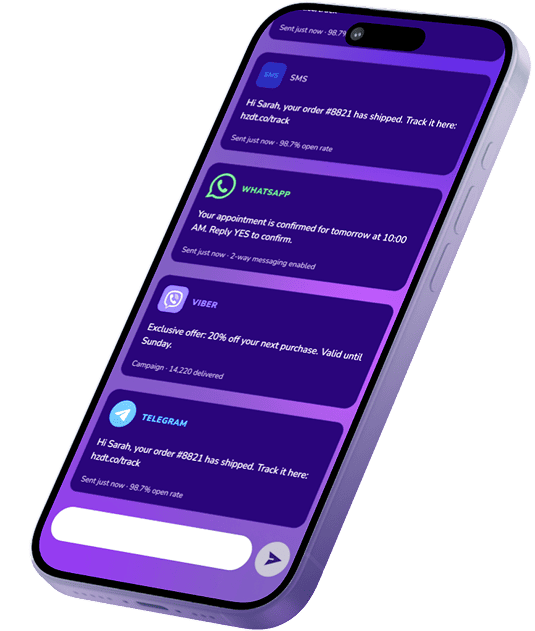
Horizon Dit supports ecommerce messaging for online retailers, marketplaces and retail chains serving UAE and GCC shoppers: order and payment confirmations, delivery and collection updates, returns, and the reminders that bring a shopper back. Events in your store systems trigger each message, the platform delivers it through SMS, WhatsApp, Email, Push or RCS, and promotional campaigns are designed to run separately from order updates.

Request a Demo
  • Order, delivery and pickup updates
  • COD order confirmation by reply
  • Returns and refund status
  • Consent-based cart and restock reminders
[Retail Challenges]

Many Order Problems Start as Communication Gaps

  • Silence after checkout

    Once payment clears, the shopper waits. Without shipping and delivery updates, that wait turns into calls and chats asking where the order is, and the service team spends peak weeks answering questions a message could have settled.

  • Cash on delivery carries its own risk

    Cash on delivery is still widely used across the region. An order nobody confirmed can be refused or go unanswered at the door, after picking, packing and the courier run have already been paid for.

  • Campaigns and orders peak together

    Ramadan, White Friday and 11.11 bring the heaviest promotional calendar and the heaviest order volume into the same few weeks. Order updates then compete for attention with every sale announcement sent that day.

  • Promotions follow stricter rules

    Promotional SMS in the UAE is subject to consent, sender identification, permitted sending times and opt-out requirements, while transactional and informational messages are treated differently. A shopper who opted out of offers still expects to hear about the order.

Retailers seldom lack a checkout confirmation. The gaps open later: updates that stop once payment is taken, a confirmation request that arrives after the courier has left, offers sent from the same sender a shopper relies on for delivery news.

Horizon Dit works from the order events your systems already record, so each stage gets its own message: a payment that fails, an item that goes out of stock, a parcel that leaves the warehouse, an order ready at the store counter.

Service messages and promotions are kept on separate tracks, each under its own consent basis and sending rules, so a crowded sale week has less chance of burying a delivery notice. Where the order needs an answer, as with a COD confirmation, the shopper replies on the channel the request came through, and the answer can flow back into the order through the integration.

Stream of violet and cyan light particles that scatters mid-flow and regathers, illustrating gaps in order communication
[Order Events]

The Moments a Shopper
Expects an Update

Each card starts from an event your ecommerce platform, order management system or store POS already records, so the shopper is not left checking a tracking page for news.

  • Order and Payment Confirmation

    The first message after checkout confirms what was bought, what was paid and what happens next. When payment is still pending or has failed, the shopper hears about it while there is time to complete the order.

    Examples: Order received · Payment confirmed · Payment failed
    TRIGGERED BY: checkout, payment status change
  • COD Order Confirmation

    Before a cash-on-delivery order is picked and dispatched, the shopper is asked to confirm it with a reply. Your team can then hold back orders that were cancelled or left unconfirmed, before any delivery cost is spent.

    Examples: Confirm COD order · Reply to cancel · Reminder for unconfirmed orders
    TRIGGERED BY: COD order placed
  • Dispatch and Delivery Updates

    The shopper follows the order from warehouse to doorstep. Courier routing and driver coordination stay with the delivery operation; these messages keep the shopper's side current.

    Examples: Order shipped · Out for delivery · Choose a delivery slot · Delivered
    TRIGGERED BY: fulfilment and carrier status updates
  • Order Changes

    Items go out of stock, orders split into several shipments, grocery baskets need substitutions and dates slip. Telling the shopper before they notice keeps a small change from turning into a cancellation or a complaint.

    Examples: Item unavailable · Partial shipment · Substitution offered · Revised delivery date · Order cancelled
    TRIGGERED BY: changes in the order management system
  • Click & Collect and Store Pickup

    For orders collected in store, the message that matters is "ready", followed by a reminder before the pickup window closes.

    Examples: Ready for pickup · Pickup reminder · Order collected
    TRIGGERED BY: store or POS status change
  • Returns, Exchanges and Refunds

    A return request starts a second cycle with milestones of its own, and each one is worth a message to the shopper.

    Examples: Return approved · Return pickup booked · Exchange shipped · Refund issued
    TRIGGERED BY: returns workflow
  • Cart and Back-in-Stock Reminders

    A saved cart or a restock request is a clear signal of intent. Reminders go only to shoppers who agreed to receive them, triggered by your store's own cart and inventory data rather than sent as a broad campaign.

    Examples: Items left in cart · Back in stock · Price drop on a saved item
    TRIGGERED BY: cart and inventory events, with consent
  • Loyalty and Repeat Purchase

    A new tier, a balance close to expiry, a consumable due for reorder. Messages like these give a past shopper a specific reason to return instead of a general offer.

    Examples: Points balance · Tier upgrade · Reward expiry · Reorder reminder
    TRIGGERED BY: loyalty programme and purchase history
[Channels]

Which Channel Carries Which Part of the Order

The roles below show where each channel tends to fit in an order's life. Which ones a retailer activates depends on its shoppers, its app and the markets it sells into.

  • SMS

    Order confirmations and delivery notices that reach any phone, including shoppers without your app, plus short replies such as confirming a COD order.
  • WhatsApp

    Order threads a shopper can answer in, so questions about a delivery slot, a pickup or a return sit next to the update that prompted them.
  • Email

    The record a shopper keeps: receipts, full order summaries, return instructions and labels, and longer campaign content.
  • Push Notifications

    For shoppers using your app or subscribed on your site: dispatch alerts, price drops on saved items and loyalty moments, delivered where the browsing already happens.
  • RCS

    Branded, visual product and order messages with images and reply buttons, where the shopper's device and operator support it.

Voice, Viber and Telegram are also available where the use case and customer base call for them.

[Solutions]

Solutions That Fit the Order Lifecycle

None of the three is needed to get started. Each answers a specific retail question, and its own page explains the mechanism.

Omnichannel Messaging

A shopper who switches channels partway through an order still gets one continuous conversation, without the same update landing on several channels together.

Explore Omnichannel Messaging →

Smart Routing

Apply different routing priorities to time-sensitive order updates and promotional traffic, particularly during peak periods when both run at full volume.

Explore Smart Routing →

Customer Verification

Secure account login, account recovery and other verification steps around the shopper account, so saved details and order history sit behind a confirmed sign-in.


Explore Customer Verification →

[Order Lifecycle]

Who Owns the Message
at Each Stage of the Order

Retail messages are sent on behalf of several teams, and friction often sits at the handoffs. Each handoff is already logged somewhere in your store, warehouse or service systems.

Once those systems are integrated with Horizon Dit, the events become messages without anyone on these teams sending them by hand. Below, one order moves through six stages, each with its event, message and owning team.

  • Discovery & Cart

    A shopper saves items, leaves a cart or asks to be told about a restock. Messages at this stage are promotional and need the shopper's prior consent.

    Owned by: marketing and CRM

  • Checkout & Payment

    Order placed; payment confirmed, pending or failed; for cash on delivery, a request to confirm. The first service message sets expectations for everything that follows.

    Owned by: ecommerce team

  • Fulfilment

    Picking, packing, stock gaps and split shipments. Changes to what was ordered are shared before the parcel leaves the warehouse.

    Owned by: warehouse and fulfilment

  • Delivery or Pickup

    Shipped, on its way, a slot to choose, or ready for collection in store. Two possible endings for the same order, and each needs a confirmation of its own.

    Owned by: fulfilment and store operations

  • Returns & Service

    Return approved, collection or drop-off arranged, refund or exchange issued. Each step closes a question before the shopper has to ask it.

    Owned by: customer service

  • Retention & Reorder

    Loyalty updates, reorder reminders and review requests, sent with the shopper's consent to further contact.

    Owned by: CRM and loyalty

[Business Outcomes]

Fewer Questions at the Service Desk, Fewer Wasted Deliveries

The shopper sees a message. The business sees what it prevented: a call that was never needed, a parcel that did not leave unconfirmed, a delivery notice that was not lost among offers.

  • Fewer Order-Status Enquiries
    Shipping notices and pickup alerts answer the most common post-purchase question before it reaches the service team.
  • Fewer Wasted COD Dispatches
    Orders that were never confirmed can be stopped before picking and courier costs are spent, instead of being discovered at the door.
  • Order Updates That Keep Their Credibility
    With promotions governed under their own consent rules, shoppers who ignore offers still have a reason to open the message about their parcel.
  • One Platform Through Sales Peaks
    Campaign traffic and the order updates it generates can share one platform during the year's heaviest sales periods.
  • Clearer Answers When an Order Is Disputed
    Better visibility into what was sent and whether it was delivered helps support teams handle order questions and disputes from the delivery record instead of from memory.
[Platform & Integration]

Wired Into the Systems That Already Run Your Store

Behind the order messages on this page sit three layers of the platform: the integration with your store, the controls around who sends what, and the infrastructure that carries peak volume.

  • Store Systems

    Ecommerce platforms, order management, ERP, POS and CRM can be connected through the API and webhooks. Order events trigger messages, and delivery status is returned to the system that sent them.
  • Consent and Accountability

    Support for recording consent and honouring opt-outs on promotional sends, role-based access for the teams that send, and messaging history for later review.
  • Built for Sales Peaks

    The platform is designed for high-volume periods, so seasonal campaigns and the order traffic they create can run side by side.
[FAQ]

Frequently Asked Questions

Yes. The API and webhooks let events in your ecommerce platform, OMS, ERP or POS, such as a placed order, a status change or an approved return, trigger the relevant message, with delivery status reported back to the sending system. How a particular platform is connected depends on your stack; technical detail sits in the Developers section.

[Ready to Start?]

Map Your Order Lifecycle to the Messages It Needs

Bring the events your store already tracks, from checkout to returns, and see how each one becomes a message on the channels your shoppers use.

Request a Demo
one system every channel full visibility